
Manual Queue System vs Digital Queue: Which Is Right for Your Business?
When several customers need help at once, even a simple wait can become confusing. People may be unsure where to stand, who arrived first, or whether they can step away without losing their place. A queue system gives staff and customers a shared way to manage that wait. The choice is often between a manual approach, such as a paper list or numbered tickets, and a digital system that records arrivals and communicates queue status electronically.
Neither option is automatically best for every organization. A manual queue can be easy to start and operate, while a digital queue can reduce repetitive tasks and make wait information easier to share. The right fit depends on customer volume, service complexity, staffing, budget, accessibility needs, and how much information the business needs to manage. This guide compares the two approaches and offers a practical way to decide.
What is a manual queue system?
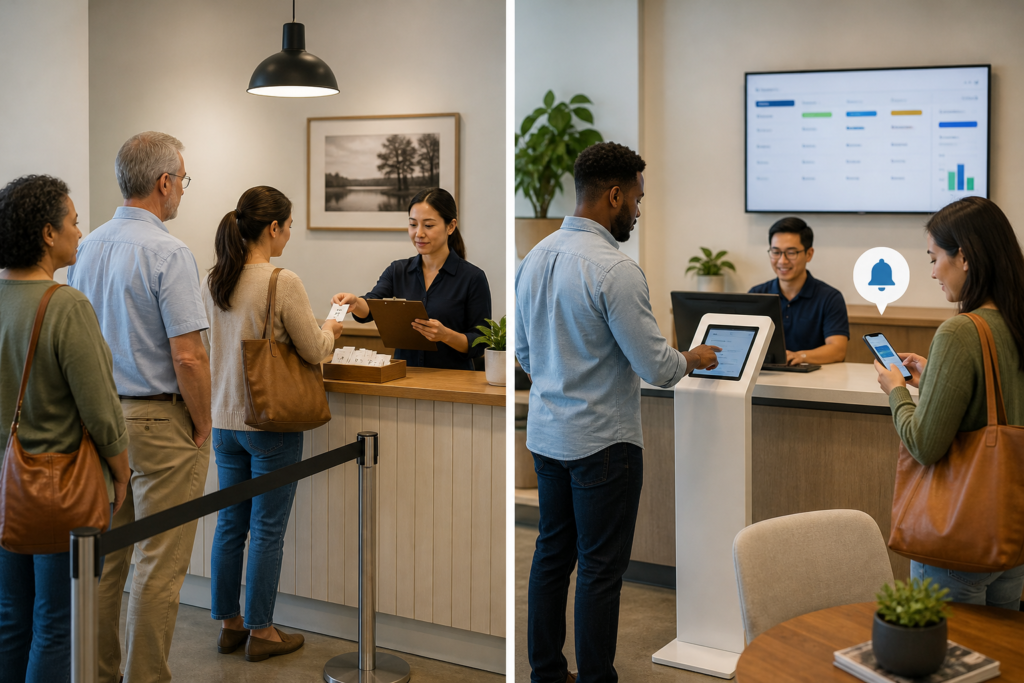
A manual queue system relies on people and physical tools to track the order of service. It might be as simple as customers lining up at a counter, a staff member writing names on a clipboard, or numbered paper tickets handed out at reception. Staff call the next person when they are ready, and the queue is updated by hand.
Manual systems vary in formality. A single line at a service desk may work well when customers can see the counter and service is straightforward. A written waiting list can be more practical when customers wait in a lobby or when one team serves several types of requests. In either case, staff members are responsible for keeping the order accurate and telling people what happens next.
What is a digital queue?
A digital queue uses software or connected devices to register arrivals and manage service order. Depending on the setup, customers may check in at a kiosk, scan a QR code, use a staff-operated tablet, or join through a website. Staff can view the queue on a dashboard and call or notify the next customer. Some systems also show queue progress on a screen or send text updates.
Digital does not necessarily mean fully automated or complex. A small business might use a simple electronic waiting list on a tablet, while a larger organization may connect check-in, multiple service desks, customer notifications, and reporting. Features differ, so it is worth checking what a product actually includes rather than assuming every digital queue has the same capabilities.
Manual queue system vs digital queue: the main differences
Cost and setup
A manual system usually has a low starting cost. A clipboard, printed tickets, signs, and pens may be all that is needed. There is little technical setup, which can make this approach attractive to a new business or a location with occasional queues. However, the ongoing cost includes staff time spent recording arrivals, answering questions, correcting mistakes, and coordinating the line.
A digital queue may require a subscription, device, internet connection, or initial configuration. Some providers offer different plans, so compare the complete cost rather than only the advertised monthly price. Consider hardware, messaging fees, support, training, and any integrations you need. Digital tools can reduce certain administrative tasks, but the savings depend on how much time the current process consumes and whether staff use the system consistently.
Speed and staff workload
For a short, visible line, a manual queue can be quick to run. Staff can call the next person without navigating software, and there may be no need to explain a check-in process. But as the queue grows, staff may spend more time writing names, repeating updates, and resolving questions about order. Handwritten records can also be difficult to read or keep current during a busy shift.
A digital system can centralize check-ins and queue status. Depending on its features, it may help staff call customers in order, move people between service points, or send routine updates without a face-to-face conversation. It still requires staff oversight: someone must handle exceptions, assist customers who cannot check in, and respond when the system or device is unavailable.
Customer experience and visibility
Customers often care less about the technology than about fairness, clarity, and realistic expectations. A physical line makes the order visible, but it may be uncomfortable for people who cannot stand for long, need to leave briefly, or are unsure whether they are in the right place. A paper waiting list can reduce crowding, but customers may have no way to know how much longer they will wait unless staff provide updates.
Digital queues can give customers more flexibility when they support remote or off-site waiting and provide useful notifications. That can make it easier to wait nearby rather than in a crowded lobby. However, a screen or text message should not be treated as a substitute for clear instructions. If the estimated wait is uncertain, communicate that honestly; precise-looking but unreliable estimates can undermine trust.
Accuracy and accountability
Manual tracking depends on careful handoffs and legible records. A name can be skipped, written twice, or crossed out without a clear explanation. These issues are manageable in a small queue when staff can see what is happening, but they become harder to spot when several employees share responsibility.
Digital systems can create a consistent record of check-ins and queue changes, though their accuracy still depends on correct setup and use. Staff need a clear process for late arrivals, customers who do not respond, priority service, and people who need to change the type of help they receive. A digital record can make it easier to review what happened, but it does not by itself guarantee fair or error-free service.
Accessibility and inclusion
A good queue process should work for customers with different abilities, ages, language needs, and levels of comfort with technology. Manual options may be easier for someone who does not use a smartphone, has limited data access, or finds digital interfaces difficult. On the other hand, standing in a physical line or needing to hear a name called can create barriers for some customers.
Digital options can support accessibility when designed well, for example through readable screens, clear language, compatible text notifications, and alternatives to audio-only announcements. They can also exclude people if a smartphone or online form is the only way to join. Whichever system you choose, offer a human-assisted route and consider both the check-in method and the way customers are called.
Data, privacy, and reporting
A paper list may collect little information, but it can expose names or other details to people nearby if left in public view. Limit what staff write down, store records securely, and dispose of them appropriately. A digital system may collect contact details, visit reasons, timestamps, or service outcomes. Before adopting one, understand what data it stores, who can access it, how long it is retained, and how customers are informed.
Digital reporting can help an organization examine arrival patterns, wait times, and service demand, if the system records those measures and the data is used carefully. These insights can inform staffing and scheduling. A manual process can also produce useful information, but compiling it usually takes additional effort and may be less consistent. Do not collect customer data simply because a tool makes it possible.
When a manual queue is a good fit
A manual approach may be the practical choice when demand is low or predictable, the queue is easy to see, and staff can manage arrivals without losing focus on service. It can also be useful as a temporary process during a pilot, a short event, or an outage affecting digital tools.
- The business handles a small number of walk-ins at a time.
- Customers can easily see where to go and how the order works.
- Waits are short and service needs are relatively straightforward.
- There is no strong need for queue reporting or remote notifications.
- Staff can consistently maintain the list or line without creating delays.
Manual does not have to mean informal. A written procedure can specify who records arrivals, what information is collected, how staff call the next person, and how exceptions are handled. Clear signage and a named staff owner can prevent many of the problems associated with an improvised queue.
When a digital queue is a good fit
A digital option is worth considering when queues are frequent, several staff members or service points are involved, or customers need a way to wait without standing in one place. It can also help when an organization wants a more consistent record of demand and service activity. The system should solve a real operational problem rather than add technology for its own sake.
- Arrival volumes regularly make a clipboard or verbal line difficult to manage.
- Customers need updates or the option to wait elsewhere.
- Several employees must share a current view of the queue.
- Managers need reliable information about demand and wait patterns.
- Staff spend substantial time answering basic questions about queue status.
Before choosing a platform, test the customer check-in steps and staff workflow. Confirm that the system supports the service rules you actually use, including priority handling where appropriate. A digital tool that is hard to operate or confusing to customers can create a new bottleneck instead of removing one.
Could a hybrid queue system work better?
Many organizations do not need to choose one method exclusively. A hybrid queue can combine digital tracking with a staff-assisted or paper fallback. For example, customers might check in on a kiosk or phone, while an employee can add someone who needs help using those options. Staff can also keep a basic contingency procedure for internet or device outages.
A hybrid approach is most useful when it has one clear source of truth. If staff maintain a digital queue and a separate paper list at the same time without a defined process, records can diverge and customers may be served out of order. Decide how arrivals are recorded, who updates the queue, and when the fallback method is used. Explain the process to staff and customers in plain language.
How to choose the right system
1. Map the current customer journey
Observe what happens from arrival to service. Note where customers check in, how staff identify the next person, which questions are repeated, and where confusion or delays occur. Include busy and quiet periods, since a process that works at one time of day may fail at another. If you need guidance for handling arrivals, see this practical guide to managing walk-in customers.
2. Identify the problem you need to solve
Be specific. Is the main issue a crowded waiting area, missed turns, too much time spent answering status questions, uneven demand, or a lack of service data? A queue tool will not solve problems unrelated to queue management, such as insufficient service capacity or unclear eligibility rules. Fix the process where possible before adding software.
3. Compare the full cost with the likely benefit
Estimate the time staff currently spend managing the queue and the cost of materials, devices, subscriptions, and support for each option. Also consider customer impact: a better-organized wait may be valuable even if it does not reduce the actual service time. Use a trial or a limited rollout when possible, and set a date to review whether the change is helping.
4. Check access, privacy, and reliability
Ask how customers can join without a smartphone, what happens if a device loses connectivity, and how staff can continue service during an outage. Review data practices and make sure the system offers only the collection and notifications you need. Accessibility should be part of the selection process, not a feature to consider after launch.
5. Define the rules and measure the result
Write down how the business handles late arrivals, no-shows, priority requests, and customers who need assistance. Then track a few useful measures, such as average wait, missed turns, staff time spent on queue tasks, or customer feedback. Compare results before and after the change, while remembering that wait times also depend on staffing, service complexity, and arrival patterns. For advice on structuring a list, read how to organize a customer waiting list.
Common mistakes to avoid
- Choosing based only on purchase price. Include staff effort, training, support, and the cost of errors or poor communication.
- Assuming digital means faster service. A queue system can organize waiting, but it cannot replace enough staff or simplify a complicated service on its own.
- Making one check-in route mandatory. Provide help or an alternative for customers who cannot use the preferred method.
- Ignoring staff training. Everyone who handles arrivals should understand the queue rules and know what to do when something goes wrong.
- Making unsupported wait-time promises. Share estimates only when they are useful and explain that actual waits can change.
If you are comparing products, start with the workflow and requirements you have identified rather than a long feature list. This overview of queue management software for small businesses can help you explore available options.
Conclusion
The choice between a manual queue system and a digital queue comes down to the demands of your service and the needs of your customers. Manual methods are inexpensive to start, familiar, and often sufficient for a small, visible line. Digital systems can make queue information easier to share, support more flexible waiting, and provide useful operational records, but they bring costs, training, and data responsibilities.
Start by identifying where your current process creates friction. If a simple, well-managed list solves the problem, there may be no reason to add software. If queues are frequent or difficult to coordinate, test a digital or hybrid approach and measure the results. In every case, make the process clear, preserve a human-assisted option, and ensure customers understand what to expect.
Manual Queue System vs Digital Queue , Manual Queue System vs Digital Queue , Manual Queue System vs Digital Queue
Manual Queue System vs Digital Queue , Manual Queue System vs Digital Queue , Manual Queue System vs Digital Queue , Manual Queue System vs Digital Queue